
WhatsApp marketing buying guides
WhatsApp Flows vs Chatbots: Choose the Right Customer Journey
WhatsApp Flows and chatbots solve different interaction problems. A Flow is strongest when a customer should complete a known sequence of fields and choices. A chatbot is stronger when the customer may ask, clarify or change direction in natural language. Choosing by feature list often produces a rigid bot or an overbuilt form.
Prepared with AI assistance and checked against the linked sources. Numerical comparisons are illustrative unless expressly sourced.
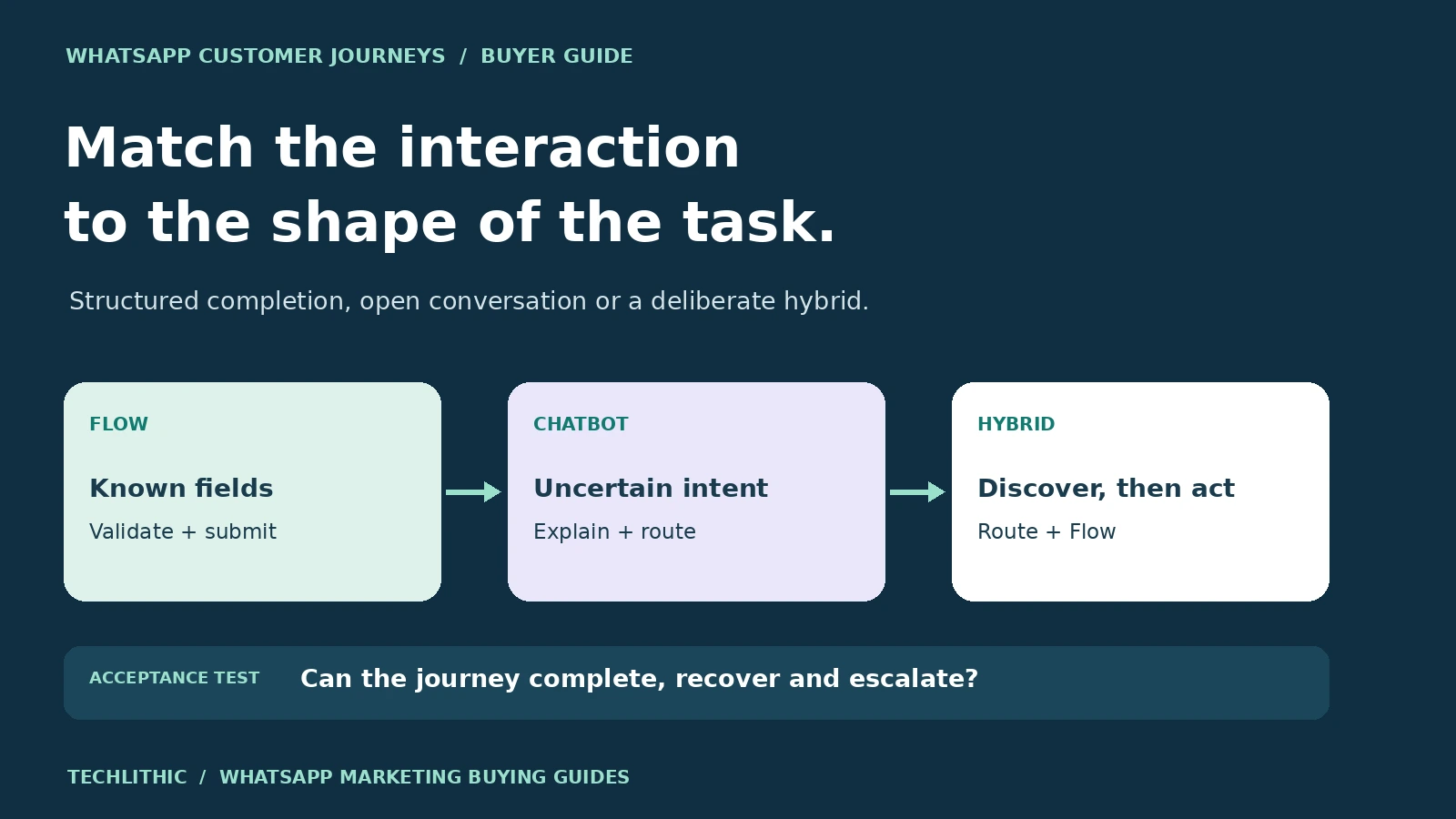
Choose the interaction from the shape of the customer task. Use a Flow for structured completion, a chatbot for interpretation and dialogue, and a hybrid when conversation should route the user into a validated form. Accept the journey only when data, fallbacks, retries, human escalation and business-system updates all work end to end.
Flows and chatbots do different jobs
A WhatsApp Flow is a structured, multi-screen experience that opens inside WhatsApp. It can present defined fields, choices and navigation so a person can complete a task without switching to an external form. WhatsApp's own product page positions Flows for lead capture, signups, appointments, insurance quotes and other in-chat actions. [1]
A chatbot manages a conversation. It receives messages, interprets intent or matches rules, asks follow-up questions, retrieves information, and decides what should happen next. Its value is not that it replaces a form with a sequence of text bubbles. Its value is handling uncertainty, explanation and changes of direction.
The official Meta Postman workspace describes the WhatsApp Business Platform as APIs for sending and receiving messages through business systems, while the Flows API creates structured rich interactions such as booking, browsing and feedback. [2] That distinction gives buyers a useful starting point: conversation discovers the path; a Flow completes a known path.
Neither is automatically better. If every valid request needs five known fields, a form is easier to validate. If customers begin with many different questions, forcing them into a form too early creates abandonment and wrong selections.
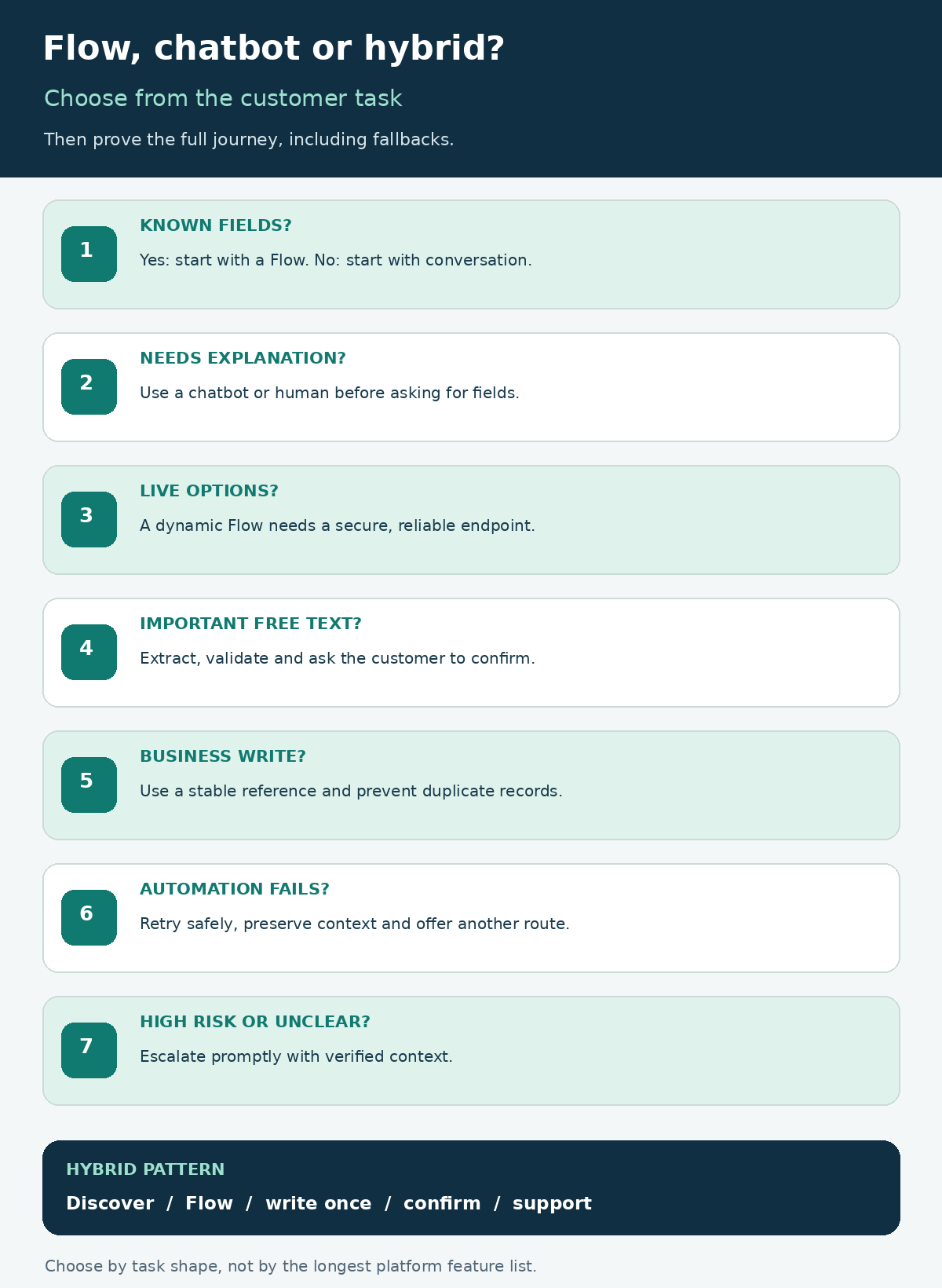
Compare the customer experience before the software
Use the same customer task to compare the two approaches. Do not compare a polished Flow demo with an unconfigured chatbot, or an AI assistant with a static form template.
| Decision area | WhatsApp Flow | Chatbot |
|---|---|---|
| Best input shape | Known fields and bounded choices | Open questions and uncertain intent |
| Interaction | Screens, components and validation | Messages, prompts and conversational turns |
| Branching | Designed paths and back-end responses | Rules, intent handling or model decisions |
| Data quality | Strong when fields and formats are defined | Needs extraction, confirmation and validation |
| Explanation | Good for concise instructions | Better for questions, clarification and education |
| Main failure risk | Rigid path or unavailable back-end option | Misunderstood intent or unsupported answer |
| Human role | Handle exceptions after submission | Take over unclear, sensitive or high-risk cases |
Make the purchase decision at journey level, not channel level. A business can use separate Flows for booking and feedback while keeping a chatbot for product questions and support triage.
Choose a Flow when completion must be structured
A Flow fits when the business already knows the required data, allowable options and completion rule. Typical candidates include appointment requests, lead qualification, event registration, feedback, product configuration and a small checkout or order-intake step.
Current AWS documentation describes WhatsApp Flows as in-app, multi-screen experiences with text inputs, radio buttons, checkboxes, date pickers and dropdown menus. It distinguishes static Flows, where screens and logic live in the Flow definition, from dynamic Flows that call a business HTTPS endpoint for data and navigation at runtime. [3]
Use a static Flow when options change rarely and submission can be processed after completion. Use a dynamic Flow when the journey must fetch live appointment slots, account-specific choices, product availability or another back-end result. Dynamic behavior adds endpoint security, latency, error handling and availability to the scope.
Do not use a Flow merely to make a long policy look interactive. Keep explanations short and put only decision-relevant information on each screen. If a customer may need to ask “Which option is right for me?”, provide a conversational route before or beside the form.
Choose a chatbot when the route is uncertain
A chatbot fits when users arrive with different goals, vocabulary or context. It can classify the request, answer a bounded set of questions, gather partial information, and route the conversation to a Flow, knowledge answer, business action or person.
Use deterministic rules for choices that must not vary, such as eligibility gates, account verification and regulated disclosures. If an AI model helps understand free text, define the topics it may answer, the sources it may use, the actions it may request and the situations that require confirmation or escalation.
Do not ask the model to silently convert every message into business data. Show the extracted value and ask the user to confirm when an error would matter. Names, dates, quantities, addresses, consent choices and product selections often deserve structured confirmation.
A chatbot should have an explicit unknown-intent path. Repeating the same question is not a fallback. Offer narrower choices, explain what the assistant can do, preserve the conversation context for an agent, and provide another support route when the automated path cannot continue.
Use a hybrid journey for discovery plus completion
Many useful journeys are hybrid. The chatbot establishes intent and context, then launches a Flow for accurate data capture. After submission, the bot confirms the result, explains the next step and keeps the conversation available for exceptions.
For appointment booking, the chatbot can answer service questions and identify the required appointment type. A dynamic Flow can show eligible locations, dates and live slots. The back end reserves the selected slot, and the chatbot confirms or transfers the user if the reservation fails.
For lead qualification, the bot can answer product questions and identify interest. A Flow can collect company, role, need, timeline and consent in consistent fields. The CRM receives one validated lead, while the conversation transcript or summary is attached only if the business has a valid purpose and appropriate notice.
For ecommerce, a chatbot can help the customer find the right category or resolve uncertainty. A Flow can collect a bounded product selection, quantity and delivery details, but payment, availability and order creation need clearly defined systems of record. If the selected item sells out during completion, return a useful alternative instead of accepting a false order.
The original WhatsApp launch described Flows as rich menus and customizable forms for actions such as seat selection, ordering and appointments without leaving chat. [4] A hybrid design keeps that structured strength while retaining conversation where it adds value.
Scope data exchange and business-system writes
Every submitted value needs an owner, type, validation rule and destination. Define the customer or account identifier, field names, required values, consent record, occurrence time, correlation token and duplicate-prevention key. Decide whether partial data is stored and how long it remains.
A dynamic Flow calls the business endpoint during the interaction. AWS documents the use of a unique flow token to track the session and encrypted data exchange for dynamic endpoints. [3] Your actual provider architecture may differ, so require the implementation partner to document encryption, key custody, authentication, health checks, timeouts and rotation.
Twilio's current Flow documentation confirms that a multi-screen experience can collect several input types and can use an endpoint integration to pass data between back-end services and WhatsApp. [5] It also publishes provider-specific limitations, which is a reminder to verify the exact route and data types with the chosen provider rather than assume feature parity.
Make writes idempotent. A repeated completion webhook or endpoint retry must not create a second appointment, order or lead. Return a stable business reference, log the journey result and define a reconciliation view for submissions that reached WhatsApp but not the target system.
Design fallbacks before the happy path ships
List the failures that matter: an unsupported question, expired Flow, unavailable endpoint, no appointment slots, stale product choice, invalid submission, duplicate request, CRM timeout, agent queue closed and customer inactivity. Give each one a customer message, system state, owner and recovery action.
Keep a direct human path. WhatsApp's current Business Messaging Policy permits automation in the customer service window but requires prompt, clear and direct escalation options, such as an in-chat agent, phone, email, web support or support form. [6] The same policy requires opt-in for business-initiated contact, respect for opt-out requests, approved templates for initiated conversations and appropriate notices and permissions for collected information.
Escalation must carry useful context without forcing the customer to repeat everything. Provide the verified fields, attempted path, last error and consent state. Do not send private back-end diagnostics into the customer conversation.
If no agent is available, say when or how the business will respond. A fallback that promises immediate help while creating an unmonitored ticket is worse than an honest support window.
Worked example: appointment booking
Consider an invented clinic booking journey. The business has three appointment types, two locations and live availability in a scheduling system. Customers often ask which appointment they need before they are ready to book.
The chatbot handles the discovery layer. It answers approved service questions, asks one or two routing questions and offers a human path for symptoms or requests outside its scope. It does not diagnose or infer medical urgency.
Once the customer selects an appointment type, a dynamic Flow displays location, date and available slot. Submission includes a journey token and deduplication key. The scheduling system holds the slot, returns a booking reference, and the chatbot sends confirmation. If the slot disappears, the Flow returns to slot selection with refreshed availability.
Acceptance fixtures cover an eligible booking, no slots, endpoint timeout, repeated submission, invalid date, abandoned Flow, customer correction, agent escalation and opt-out. The business checks that one booking is created, the selected slot is released after the defined timeout, no sensitive free text is requested unnecessarily, and the agent receives the confirmed context.
This is an educational design, not healthcare, privacy or legal advice. A real implementation needs requirements for the actual jurisdiction, provider, data and clinical workflow.
Use this buyer acceptance checklist
Before comparing proposals, confirm the following:
- Every journey starts with a named customer goal and measurable completion event.
- Structured fields go into a Flow; ambiguous questions remain conversational or move to a person.
- Static and dynamic Flow choices are explicit, with the reason for any runtime endpoint.
- Each collected field has a type, validation rule, purpose, retention rule and system owner.
- Chatbot topics, sources, actions, confirmations and unknown-intent behavior are documented.
- Retries and repeated submissions cannot create duplicate business records.
- Endpoint failure, unavailable choices, abandoned journeys and stale data have recovery paths.
- Opt-in, templates, privacy notice, opt-out and human escalation match current platform policy and applicable law.
- The team can trace one test user from message or Flow launch through completion, system write and confirmation.
- Handover includes Flow definitions, bot logic, prompts or rules, integration mappings, test fixtures, evidence, monitoring and an operating runbook.
Ask vendors to price Flow design, chatbot design, API work, templates, testing, analytics, agent handoff, provider fees and ongoing maintenance separately. A cheaper quote may exclude the business-system integration that makes the journey useful.
TechLithic owns Sendwo and offers WhatsApp Forms and Flow Builder setup, AI chatbot development and shared-inbox automation. The same acceptance requirements should apply to Sendwo, TechLithic or any competing provider. For the wider implementation boundary, use the self-service versus managed WhatsApp setup guide. For reliable back-end writes, see the CRM and ecommerce integration scoping guide.
Frequently asked questions
Is a WhatsApp Flow the same as a chatbot?
No. A Flow is a structured in-app experience with defined screens, inputs and navigation. A chatbot manages conversational messages and can interpret, answer or route. A chatbot can launch a Flow as part of a hybrid journey.
Can a WhatsApp Flow use live business data?
Yes, a dynamic Flow can exchange data with a business HTTPS endpoint. That adds security, availability, latency, encryption, retry and reconciliation requirements that should be included in the implementation scope.
When is a chatbot better than a Flow?
Choose a chatbot when customers may express the same need in many ways, ask follow-up questions, need explanation or move between goals. Use confirmations before converting important free text into business records.
Should a booking journey use both?
Often yes. The chatbot can identify the service and answer questions, while a dynamic Flow displays validated locations, dates and slots. The final booking should be created once in the scheduling system and confirmed with a stable reference.
What should happen when automation fails?
Provide a useful error, preserve verified context, prevent duplicate writes, offer a retry or alternate path and make human escalation clear. The customer should not have to restart without explanation.
What should a vendor hand over?
Require Flow definitions, chatbot rules or prompts, source and integration mappings, template inventory, test fixtures and results, monitoring, escalation design, access ownership and an operating runbook.
Sources and research notes
Sources checked on 2026-10-24. Pricing and policy documents can change; verify current terms before approving expenditure.
- WhatsApp Business: WhatsApp Flows
Official product page describing in-WhatsApp actions, common use cases and creation through templates, Flow Builder or developer tools.
- Meta official Postman workspace: WhatsApp Business Platform
Meta's official API workspace distinguishing messaging APIs from the WhatsApp Flows API and its structured interaction use cases.
- AWS End User Messaging: WhatsApp Flows
Primary AWS provider documentation for static and dynamic Flows, components, flow tokens, endpoint exchange and key handling.
- WhatsApp Blog: Creating New Experiences for People and Businesses
Official WhatsApp launch description of rich menus and customizable forms for in-chat actions.
- Twilio documentation: whatsapp/flows
Primary Twilio provider documentation covering multi-screen inputs, endpoint integration, Flow creation and provider-specific limitations.
- WhatsApp Business Messaging Policy
Current official policy for opt-in, initiated templates, the customer service window, automation escalation and information permissions.
Official WhatsApp, Meta, AWS and Twilio sources were checked on October 24, 2026. Platform and provider capabilities can change. Provider-specific restrictions are not presented as universal WhatsApp rules. The decision table, hybrid journey pattern, appointment example and acceptance checklist are original educational frameworks. Businesses must verify current platform policy and obtain appropriate privacy, legal, security and industry advice for their actual use case.