
WhatsApp marketing buying guides
WhatsApp Template Governance: Approval, Consent and Change Control
WhatsApp template approval is not the end of governance. Buyers need an operating system that connects each approved template to a specific purpose, consent record, category, variable contract, language owner, campaign rule, quality signal and retirement decision.
Prepared with AI assistance and checked against the linked sources. Numerical comparisons are illustrative unless expressly sourced.
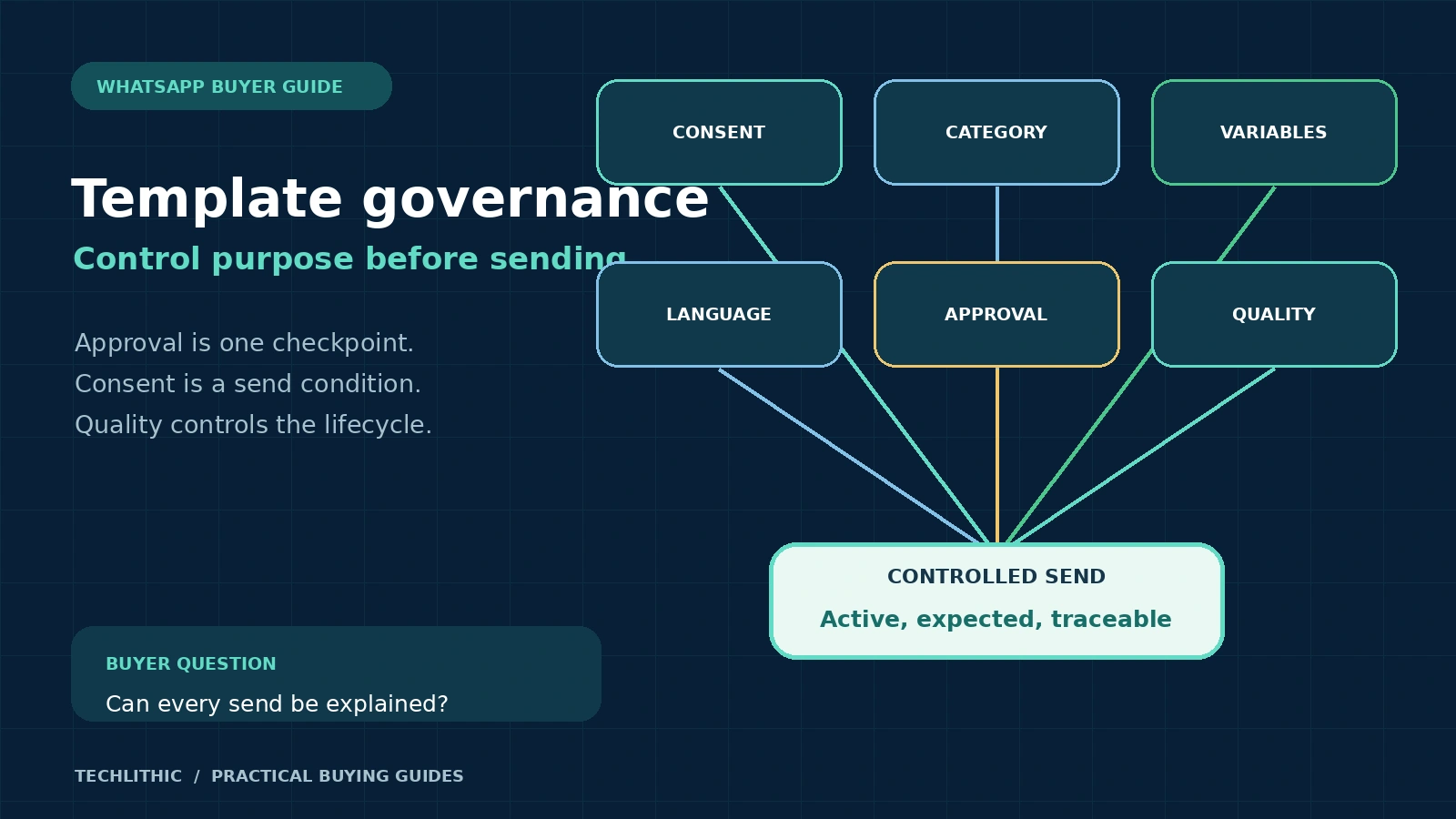
Treat every template as a controlled production asset. Maintain a template register, separate utility and marketing purposes, prove opt-in before audience entry, validate every variable, approve each translation, monitor status changes automatically and retire superseded templates. Buy tooling or managed support only when it leaves this evidence under buyer control.
Treat approval as one control, not the operating model
A template can be approved and still be wrong for a particular audience, consent record or campaign. Approval shows that the submitted content passed platform review. It does not prove that every recipient asked for the message, every variable is safe, every translation is accurate or every send remains useful.
WhatsApp's Business Messaging Policy, last updated September 23, 2026, says businesses may contact people only after receiving the required number or username and opt-in permission. It also requires businesses to honor opt-out requests and says approved templates must be used only for their designated purpose. Meta retains the right to review, approve, pause and reject templates. [1]
Governance therefore begins before drafting and continues after launch. The minimum loop is request, consent check, category decision, content and variable review, language review, submission, controlled pilot, monitoring, change and retirement.
The buyer should own the evidence even when a BSP, agency or managed-service team operates the platform. Otherwise an approved template library becomes a pile of similarly named assets that nobody can safely change or remove.
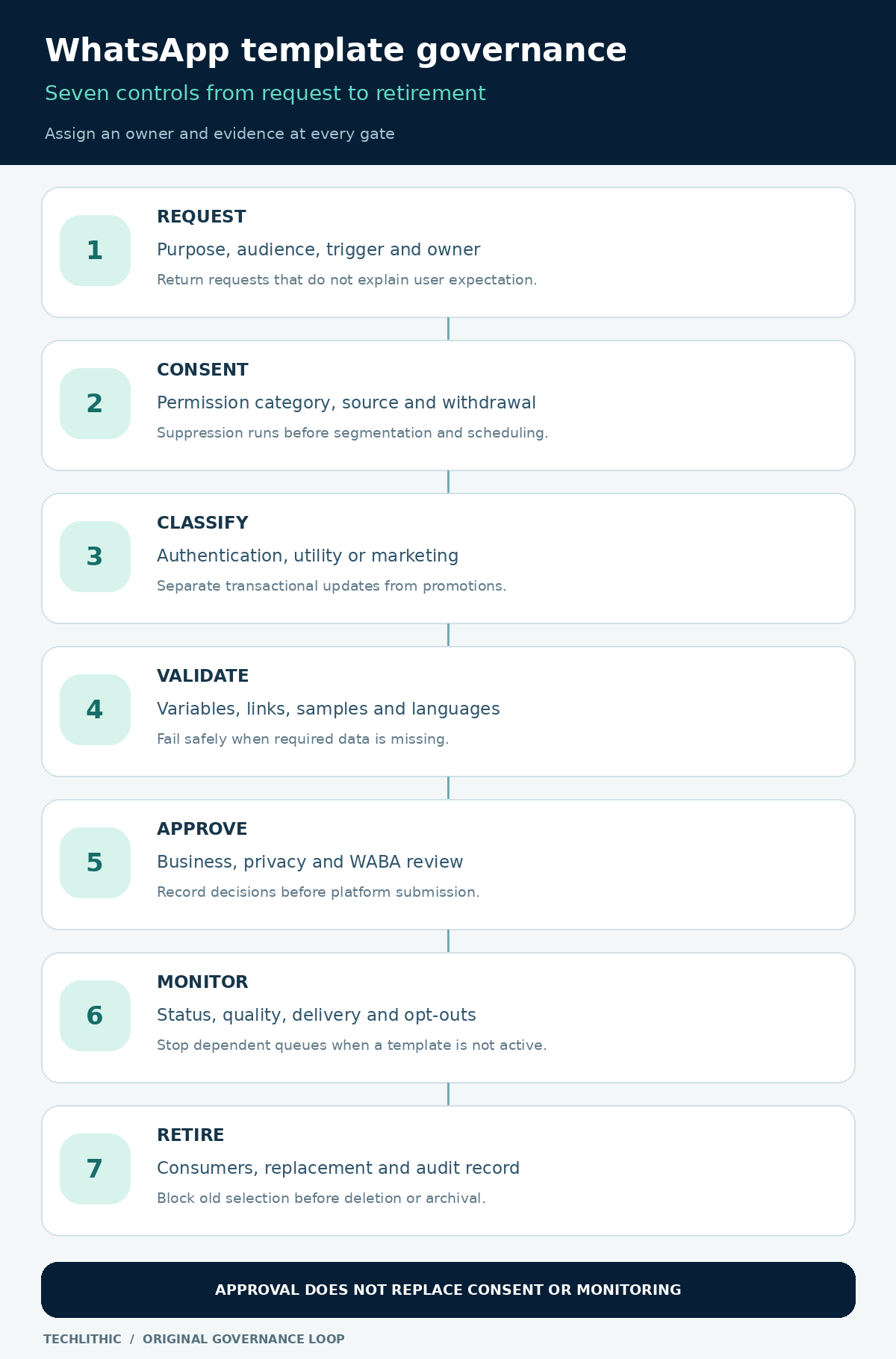
Create one template register as the source of truth
Keep a register that joins business intent to the platform object. For every template and language, record the WABA, platform template ID, stable internal key, template name, category, language code, business purpose, audience, trigger, owner, consent category, variables, sample values, buttons, approval status, quality state, dependencies, creation date, last review and retirement state.
| Register field | Question it answers | Acceptance evidence |
|---|---|---|
| Purpose and category | Why can this message be sent? | Approved use case and category rationale |
| Consent category | Which permission admits a recipient? | Consent event, source, wording and time |
| Variable contract | What data can enter each placeholder? | Type, source, validation and safe fallback |
| Language record | Who approved this exact translation? | Locale owner, review date and template ID |
| Status and quality | Can automation send it now? | Latest API or webhook state |
| Lifecycle | Which version is current? | Change ticket, replacement and retirement date |
Do not use a spreadsheet as the runtime authority if campaigns can bypass it. The sending layer should reference a controlled internal key that resolves only to an approved, active template and language. The register can be a database, governed configuration file or platform table, provided changes are permissioned and auditable.
Separate request, approval and sending permissions
A campaign requester should not be able to draft, approve and launch the same template alone. Assign at least five responsibilities: business owner, messaging or content owner, privacy or compliance reviewer, WABA administrator and integration or campaign operator. Smaller teams may combine roles, but the approval record should still show who made each decision.
The business owner confirms purpose, audience, trigger and expected user value. The messaging owner maintains naming, tone, reusable patterns and translations. The privacy reviewer checks the consent promise, opt-out path, data minimization and jurisdiction-specific requirements. The WABA administrator submits and tracks the platform object. The integration owner maps variables, status webhooks and send controls.
Use a request form that forces the requester to choose an existing consent category and specify whether the message is authentication, utility or marketing. If the requester cannot state why the recipient expects the message, return the request before copy review.
Require two-person approval for new marketing purposes, sensitive operational messages and changes to audience logic. Routine spelling corrections may use a lighter path, but they still need a recorded version and platform review when the template object changes.
Join consent evidence to audience selection
Consent is not a checkbox floating outside the campaign system. Store who consented, which business they consented to hear from, the WhatsApp channel, the message category, the exact notice or notice version, the collection source, timestamp and withdrawal status. Keep enough evidence to explain why a person entered an audience.
WhatsApp says the business is responsible for the opt-in method and compliance with applicable law. Its policy also requires opt-outs to be honored whether they arrive on or off WhatsApp. [1] 360dialog's provider documentation similarly describes opt-in as permission for a specific business and recommends separate consent by message category, clear opt-out instructions and monitoring when new opt-in methods are introduced. [2]
Build suppression before segmentation. A global WhatsApp opt-out must block all non-required sends. Category-level withdrawal should block that category without silently restoring it during a later import. Apply age, geography, regulated-vertical and frequency rules before the audience reaches the send queue.
Do not buy a platform that stores only a boolean called whatsapp_opt_in. Buyers should require consent versioning, import provenance, suppression precedence, export and deletion paths, and an audit view that links a recipient to the permission used for a send.
Classify the message by purpose, not by desired price
Authentication templates support one-time passcodes through a defined structure. Utility templates relate to a specific user-initiated transaction or subscription. Promotional content, product announcements and mixed utility-plus-promotion normally belong in marketing. A lower-priced category is not a governance strategy.
Twilio's current provider documentation explains that Meta may override a selected category and treats mixed marketing and utility content as marketing. It also lists category-content mismatch as a rejection reason. [3] 360dialog documents category validation at creation and status updates when Meta disagrees with the selected category. [4]
Record the category rationale beside the copy. An order-dispatch notice can be utility. Adding an unrelated discount to that notice changes its purpose and should be handled as a separate marketing template with the appropriate consent and audience rules.
Do not let a campaign operator choose category during launch. Category should be approved with the use case, stored in the register and compared with the platform's current value. A category change should trigger pricing, consent and audience review before the next send.
Govern variables and translations as production interfaces
Each variable is a data contract. Give it a semantic name internally, even when the platform uses numbered placeholders. Define its source, type, maximum practical length, allowed characters, empty-value behavior, masking rule and example. Validate at message assembly, not after the API rejects the request.
Prevent variables from changing the meaning of approved copy. Do not insert arbitrary offer text into a generic placeholder, place untrusted URLs into buttons or include sensitive identifiers that the policy prohibits requesting. Meta's official WhatsApp Postman collection shows that templates are managed as platform objects with names, categories, languages and components, and exposes create, edit, list and delete operations. [5]
Twilio documents common rejection causes including malformed or adjacent placeholders, non-sequential numbering, language mismatch, vague content and variables at the beginning or end of a message. [3] Use realistic sample values during review so meaning, line wrapping and button destinations can be evaluated.
Treat each translation as its own governed release. A language owner should check meaning, local tone, date and currency formats, variable order, legal text and button labels. Do not mark a locale ready merely because machine translation produced a string.
Automate status and quality monitoring
Campaigns should not discover a paused template through failed customer sends. Subscribe to the available status-change mechanism, reconcile it with a scheduled inventory pull and stop queues when a template is not active. Route rejected, paused, disabled, category-change and appeal states to named owners.
Provider documentation distinguishes pending, approved, rejected, paused and disabled states. Paused or disabled templates cannot be sent, and recurring negative feedback can move a template toward those states. [3] 360dialog also documents active quality levels and a template-status webhook, with low quality signaling that a pause or disablement may follow. [4]
Monitor by template, language, audience source and campaign, not only by phone number. Track sends accepted by the provider, delivery outcomes, reads where available and permitted, replies, opt-outs, blocks, complaints and failures. Averages across all templates can hide one damaged audience or translation.
Define stop rules before launch. For example, an unexpected status change stops new sends immediately; a sharp opt-out increase pauses the campaign for investigation; a consent mismatch blocks the affected audience even if platform quality remains high. Exact thresholds should come from the buyer's baseline, risk and volume, not an invented universal benchmark.
Version changes and retire old templates deliberately
Template copy, category, variable mapping, buttons, translations and audience logic can change independently. Give each change a ticket containing the reason, affected workflows, old and new values, approvals, test evidence, rollout plan and rollback path.
Never change a template in place without tracing its consumers. Search campaign schedules, automation flows, API configuration, CRM triggers and fallback logic. Create a replacement when the change alters purpose, consent category or variable meaning. Keep the old asset blocked from new use while dependent workflows migrate.
The official Meta Postman collection exposes list, edit and delete operations for templates, which makes inventory reconciliation and controlled cleanup possible through the API. [5] Platform capability does not decide business retention. The governance policy should define when a rejected draft is removed, when an inactive approved template is retired and how long audit evidence is retained.
Retirement is complete only when the template is no longer selectable, all workflows point to an approved replacement or are disabled, scheduled sends are cleared, documentation is updated and the register records the decision.
Worked example: split an order update from a promotion
Consider an invented ecommerce business that wants to send a dispatch notice and offer a discount on the next purchase. This is an educational example, not a client result.
The requester first proposes one message: "Order {{1}} has shipped. Track it at {{2}}. Use SAVE10 on your next order." The governance review separates the purposes. The dispatch notice is tied to a specific transaction, while the discount is promotional. Combining them would mix utility and marketing content.
The team creates a utility template with order reference, tracking link and support button. Variables have defined sources, URL allowlisting, length checks and a safe failure path that sends no message if the tracking URL is missing. The consent record shows that the customer requested order updates.
A separate marketing template uses only recipients who gave promotional WhatsApp consent and have not opted out. It has its own frequency rule and stop keyword. Each supported language receives human review and its own register record.
After approval, a small internal and consented pilot proves variable rendering, links, suppression, replies and status handling. The production automation resolves the stable internal keys to active platform templates. If the marketing template is paused, the promotion queue stops without affecting dispatch notices.
Use this buyer and acceptance checklist
- Does every template have a purpose, category, owner, consent category and current platform ID?
- Can the system show the exact consent evidence used to admit a recipient?
- Do global and category-level opt-outs override imports, segments and scheduled sends?
- Are authentication, utility and marketing purposes kept separate?
- Does every variable have a source, type, validation rule, sample and safe failure behavior?
- Are button URLs constrained to approved domains and tested after substitution?
- Is each language version reviewed by a named language owner?
- Are request, privacy review, WABA submission and campaign launch permissions separated?
- Do status webhooks or alerts stop sends for rejected, paused or disabled templates?
- Can the buyer reconcile the local register with all templates in the WABA?
- Are quality, delivery, response, opt-out and complaint signals visible by template and locale?
- Does each change identify dependent campaigns, automations and integrations?
- Can a superseded template be blocked from selection before platform deletion?
- Will the buyer receive the template register, consent export, configurations, runbooks and owner access?
- Are platform fees, managed-service fees and change work separated in the proposal?
A managed WhatsApp marketing automation scope should leave this control evidence with the buyer. TechLithic operates Sendwo and offers a Sendwo managed service, so apply this checklist to TechLithic, Sendwo or any other provider.
Do not create a new template when the message can be sent inside an active customer-service window, an existing template already matches the same purpose and variables, or the business cannot prove the recipient's expectation. For platform selection, pair this guide with the WhatsApp API cost guide. For provider changes, use the BSP migration checklist.
Frequently asked questions
Does an approved WhatsApp template prove consent?
No. Platform approval and recipient permission are separate controls. The business must retain valid opt-in evidence for the message purpose and honor opt-outs before sending.
Can utility and promotional content share one template?
Mixed utility and marketing content is generally treated as marketing. Separate the transactional update from the promotion so category, consent, audience and performance can be governed independently.
Should every language use the same approval record?
No. Keep a governed record for each language version, including its platform identity, translation owner, variable order, review date and status.
What should happen when a template is paused?
Stop dependent send queues, notify the owner, inspect audience and feedback signals, correct the underlying issue, follow the platform review path and resume only after the template is active and the business approves the restart.
What should a buyer receive from a managed service?
Buyer-owned access, the complete template and consent registers, approval history, variable mappings, status alerts, campaign dependencies, change records, operating runbooks and an export or exit process.
Sources and research notes
Sources checked on 2026-11-03. Pricing and policy documents can change; verify current terms before approving expenditure.
- WhatsApp Business Messaging Policy
Meta's current policy on opt-in, opt-out, approved templates, designated purpose, customer-service windows, data protection and enforcement, last updated September 23, 2026.
- 360dialog documentation: Opt In
Provider documentation on opt-in evidence, supported collection methods, message-category consent, opt-out handling and quality monitoring.
- Twilio documentation: Message template approvals and statuses
Provider documentation on approval criteria, categories, variables, rejection reasons and pending, approved, rejected, paused and disabled states.
- 360dialog documentation: Template Statuses
Provider documentation on category validation, template review, status webhooks, quality levels, pausing, disablement and appeals.
- Meta official Postman collection: WhatsApp templates
Meta's official API collection showing template inventory plus create, edit, list and delete operations across template components and languages.
Meta's WhatsApp Business Messaging Policy, Meta's official Postman collection, Twilio documentation and 360dialog documentation were opened on November 3, 2026. Platform behavior changes over time, so buyers should verify current categories, status events, review paths and pricing before implementation. The ecommerce example is original education, not a client result. This article does not provide jurisdiction-specific legal advice.